Notion Brand Questionnaire Template
Building a brand identity often feels like trying to solve a puzzle with missing pieces. You sit down with a client, full of creative energy, but the conversation wanders. You end up with scattered notes in email threads, random screenshots in a chat app, and a vague sense of what they actually want. That chaos is exactly why a structured approach is vital. A professional workflow isn't just about talent; it's about organization. This is where the Notion Brand Questionnaire Template steps in, transforming a messy discovery phase into a streamlined, strategic process.
More Than Just a Form: The Anatomy of the Template
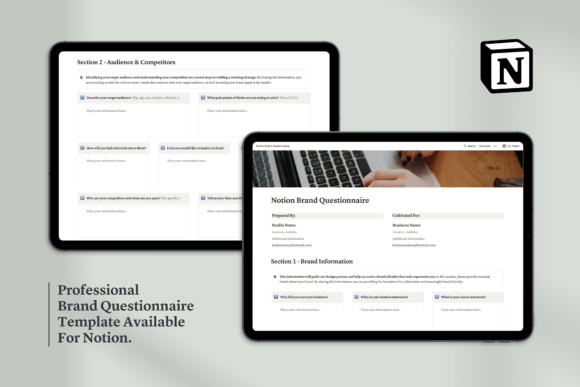
When you first open this template, you immediately notice the visual hierarchy. It isn't a dense wall of text that scares clients away. Instead, it uses Notion’s native functionality to create a clean, inviting interface. The visual characteristics are defined by clarity and breathing room. It relies on a balanced mix of toggles, checklists, and database properties that feel modern and approachable. The personality is strictly professional yet friendly—it guides the client without dictating to them. The style is minimalist, utilizing Notion's default sans serif typography for body text to ensure maximum legibility across devices, while using distinct headers to break up content. This creates a visual flow that mimics a natural conversation rather than a tax audit.
The overall appeal lies in its modularity. Whether you are a freelance designer or a marketing agency, the structure adapts to you. It moves logically from high-level concepts to granular details. It begins with simple personnel info to break the ice, then dives deep into the "Brand Information" section. This isn't just asking for a logo; it’s asking for the why. By the time you reach the "Aesthetic Principles" section, the client is already thinking like a designer, having established the verbal foundation for their visual identity.
Strategic Insights and Audience Alignment
A common pitfall in branding is jumping straight to color palettes and fonts. However, a premium font or a trendy gradient means nothing if it doesn't speak to the target audience. The Notion Brand Questionnaire Template enforces a "strategy-first" methodology. It includes dedicated sections for "Audience & Competitors" that force the client to define who they are talking to and who they are up against.
This section is invaluable for market positioning. By asking specific questions about the audience's pain points and the competitors' weaknesses, the template helps you identify gaps in the market. For example, if a client's competitors are all using stiff, corporate serif fonts, the data might suggest that a friendly, handwritten script font could be the key to differentiation. This strategic grounding ensures that the visual choices you make later—whether it’s a modern typography approach or a retro aesthetic—are backed by data, not just personal taste.
Defining the Visual Language
The heart of the questionnaire lies in the "Aesthetic Principles" section. This is where the creative direction truly takes shape. The template is designed to extract nuanced preferences that clients often struggle to articulate verbally. Instead of asking "What fonts do you like?", it guides them through concepts of personality and style.
It addresses the practicalities of design assets and usage. Does the client need a heavy-duty display font for large-scale packaging, or a highly legible sans serif font for a mobile-first website? The questionnaire prompts these discussions early. It covers everything from logo design requirements to social media graphics. By establishing these parameters, you can confidently select typefaces—whether it's a classic serif font for an editorial look or a clean modern typography style for a tech startup—that serve a functional purpose.
Practical Application Across Industries
The versatility of this template is its greatest strength. It works seamlessly for a wide variety of projects:
- Editorial & Publishing: For bloggers and publishers, the template helps define the tone of voice, which directly influences the choice of body text and headline fonts to ensure readability and engagement.
- Packaging Design: Crafters and small business owners can use the "Visual Identity" section to specify requirements for physical products, ensuring the brand identity translates well from screen to shelf.
- Web Design: Digital agencies can use the "What's Next?" section to plan the technical implementation, ensuring the chosen creative font has the correct licensing and file formats for web use.
It also serves as a safeguard against scope creep. By having the client explicitly list their "likes" and "dislikes" (the "Avoidance of Specifics" section), you create a reference point for feedback. If a client rejects a design because it "feels too playful," but the questionnaire stated they wanted a "serious and trustworthy" vibe, you have a tool to realign the project without frustration.
Streamlining the Workflow
Ultimately, the Notion Brand Questionnaire Template is about efficiency and professionalism. It elevates your process, showing clients that you have a method to the madness. It ensures that by the time you are selecting design assets or finalizing font pairing options, you have a rock-solid understanding of the brand's core. It turns the subjective nature of design into a structured, collaborative journey, resulting in brand identities that don't just look good, but perform effectively in the real world.