Master Your Brand Presentation with This Photoshop Template
Creating a cohesive brand identity goes beyond just having a great logo. It’s about how you present every element—from color palettes to typography to iconography—in a way that feels intentional and professional. That’s where the Brand Guidelines - Photoshop Template comes in. It’s a thoughtfully designed resource that helps you showcase your brand’s visual system with clarity and consistency, whether you’re pitching to clients, onboarding new team members, or simply getting your own brand materials organized.
A Template Built for Modern Brand Storytelling
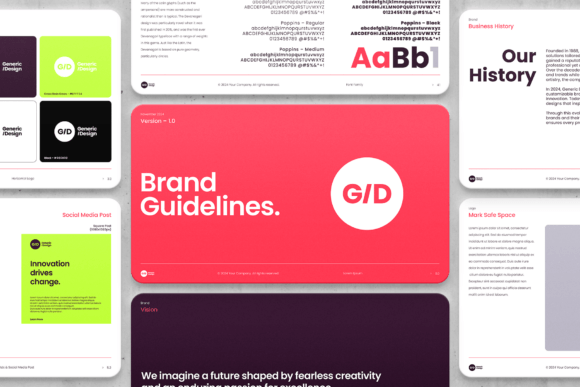
At its core, the Brand Guidelines - Photoshop Template is more than just a set of artboards—it’s a storytelling tool. With 30 carefully structured slides, it guides you through presenting your brand’s personality, values, and visual language in a logical flow. The design is clean and contemporary, with plenty of white space to let your content breathe. This isn’t a cluttered, overly decorated template; it’s built to highlight your brand elements without distraction.
One of the standout features is the use of Smart Objects for logos. This means you can simply drag and drop your logo into designated layers, and it automatically scales and adapts without losing quality. For anyone who’s struggled with resizing assets across different presentations, this is a real time-saver. The template also makes it easy to swap out colors and typography. It’s set up to work seamlessly with Google Fonts—so if you’re using free typefaces like Montserrat, Playfair Display, or Open Sans, you can update the entire deck with just a few clicks. Of course, it also supports premium fonts if you’re working with licensed typefaces for a more distinctive brand voice.
Practical Applications for Designers and Brand Builders
Where does this template truly shine? Think about client presentations. If you’re a freelance designer or agency, walking a client through a brand guidelines deck can be a pivotal moment. It’s not just about showing them a logo and some colors—it’s about explaining the why behind each choice. The structured artboards in this template help you do that without overwhelming your audience. You can dedicate individual slides to your logo variations, color system, typography hierarchy, imagery style, and even specific applications like social media or packaging.
For entrepreneurs and small business owners, this template is equally valuable. Maybe you’ve just worked with a designer to develop your brand identity, and now you need to document it so everyone on your team uses it correctly. Or perhaps you’re building your brand yourself and want to ensure consistency as you create materials for your website, email newsletters, or print collateral. Having a clear, visual reference like this makes it much easier to maintain brand integrity over time.
Design Details That Make a Difference
What I appreciate most about this template is the attention to practical details. The built-in color legend, for example, is a small but powerful feature. Instead of just showing swatches, it helps you organize and explain your color system—whether you’re using primary, secondary, or accent colors. This is especially helpful if you’re working with a complex palette or need to communicate color usage guidelines to developers or printers.
Then there’s the exclusive “Icon, Social & Ads” section. This part of the template includes mockups for MacOS and iOS app icons, a favicon, and editable layouts for Instagram and X (formerly Twitter). For anyone building a digital presence, this is incredibly useful. It ensures your brand looks polished across platforms—from the tiny favicon in a browser tab to the profile picture on social media. The fact that these are editable means you can adapt them to different campaigns or seasonal updates without starting from scratch.
Tips for Getting the Most Out of Your Template
If you decide to use the Brand Guidelines - Photoshop Template, here are a few practical tips to keep in mind. First, start with your brand’s core message. Before diving into design, jot down the key attributes you want your brand to convey—whether that’s trustworthy, innovative, playful, or luxurious. This will guide your choices as you customize the template.
Next, pay close attention to typography. The template is designed to work with a variety of font pairings, so take the time to test a few combinations. For instance, pairing a clean sans serif for body text with a distinctive serif for headings can create a nice visual hierarchy. If you’re using Google Fonts, consider how the typefaces render across different devices and screen sizes. Readability is key, especially for longer text blocks in your guidelines document.
Also, don’t overlook the importance of consistency. Use the same logo version, color codes, and font styles throughout the deck. This reinforces your brand’s professionalism and makes the guidelines easier to follow. The template’s structure helps with this, but it’s still worth double-checking as you work.
Who Stands to Benefit Most?
This template is particularly useful for creatives who regularly develop brand identities—designers, brand strategists, and marketing professionals. But it’s also a great resource for bloggers, content creators, and crafters who want to present their personal brand in a more structured way. Even if you’re not designing for clients, having a clear set of guidelines can help you stay consistent as you grow your platform or business.
For those in publishing or editorial design, the template can serve as a style guide for ongoing projects. It helps ensure that every issue of a magazine, every blog post, or every social media graphic feels like it’s coming from the same brand. This kind of consistency builds recognition and trust with your audience over time.
In the end, the Brand Guidelines - Photoshop Template is about giving you the tools to present your brand with confidence. It’s not about flashy effects or trendy design gimmicks—it’s about clarity, organization, and professionalism. Whether you’re a seasoned designer or a small business owner stepping into brand building for the first time, it offers a practical way to bring your visual identity to life.