Vigo Google Slides Template: A Modern Design Toolkit
Creating a polished, professional presentation shouldn't require a design degree or hours of wrestling with formatting. The Vigo Google Slides Template understands this reality. It's a comprehensive design system built for people who need to communicate ideas clearly and stylishly, without getting lost in the weeds of layout and composition.
Understanding the Vigo Aesthetic
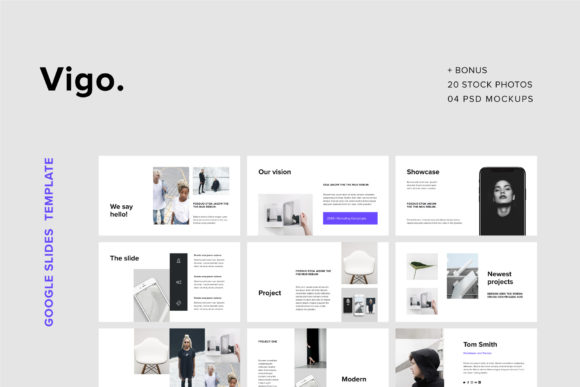
At its core, the Vigo Google Slides Template embraces a clean, minimal philosophy. Think generous white space, crisp typography, and a restrained color palette that lets your content breathe. This isn't about flashy effects or trendy gradients—it's about modern simplicity that feels both professional and approachable. The overall personality strikes a balance between corporate credibility and creative energy, making it versatile enough for a startup pitch deck or a fashion portfolio.
The template includes 110+ unique slide designs, each built in a 16:9 Full HD format (1920x1080px). Every element is vector-based, which means you can resize icons, maps, and device mockups without losing sharpness. The 500+ vector line icons included are fully editable—change colors, scale them up or down, and they'll stay crisp on any screen. This vector-first approach is a practical advantage for anyone working across different output sizes, from projector presentations to social media graphics.
Where Vigo Works Best
The versatility of the Vigo Google Slides Template extends well beyond standard business presentations. Its clean layout structure adapts naturally to several creative and professional contexts.
Portfolio and Showcase Presentations benefit from the template's emphasis on visual hierarchy. The included 20 high-resolution stock photos (minimum 4000x3000px) and 4 PSD mockups give you a head start on creating compelling visual narratives. If you're a designer, photographer, or creative agency, these assets help you present work in a polished, gallery-like format without sourcing external images.
Ebooks and Digital Publications gain structure from the template's consistent grid system. The modern typography choices and balanced layouts make text-heavy slides readable, while the minimal design language keeps pages from feeling cluttered. For bloggers and content creators looking to repurpose written material into visual formats, this template provides a solid foundation.
Marketing and Brand Presentations benefit from the template's professional polish. The included vector devices—phone, tablet, watch, and notebook mockups—let you showcase digital products, app interfaces, or marketing campaigns in context. Small business owners presenting to investors, partners, or clients will find these elements particularly useful for demonstrating product-market fit visually.
Fashion and Lifestyle Catalogues align naturally with the template's stylish, editorial sensibility. The clean layouts let product imagery take center stage, while the modern design framework maintains a cohesive brand identity throughout. The drag-and-drop photo placeholders make it straightforward to swap in your own product shots.
Practical Features That Save Time
One of the most valuable aspects of the Vigo Google Slides Template is its focus on real-world usability. Every design decision seems informed by how people actually work with presentation software.
The one-click color changing system means you can adapt the entire template to your brand palette in minutes. Rather than manually updating each element, the vector graphics respond to color changes globally. This consistency is critical for brand identity work—ensuring your visual language stays uniform across every slide.
The easy drag-and-drop photo placeholders eliminate the tedious process of cropping and positioning images manually. Simply drop your photo into the designated shape, and the template handles the rest. For marketers and entrepreneurs juggling multiple tasks, this kind of workflow efficiency matters.
With 500+ vector line icons included directly in the slides, you won't need to hunt for external icon packs. These are fully editable—resize them for emphasis, recolor them to match your palette, or combine them for custom infographics. The vector maps included are equally practical for presentations involving geographic data or regional market analysis.
The template also includes free font links and documentation, removing guesswork from the setup process. You won't need to purchase additional typography assets to get started—the typeface choices complement the minimal design language and support both headings and body text effectively.
Evaluating Fit for Your Project
Before committing to any design template, it's worth considering how well it aligns with your specific needs. The Vigo Google Slides Template excels in contexts where clarity, professionalism, and modern aesthetics are priorities. If your project demands bold, maximalist design or highly ornate visual styles, a different approach might serve you better.
For brand identity work, the template's clean framework acts as a neutral canvas. It supports your content without competing for attention—exactly what you need when building recognition and trust. The consistent visual hierarchy across all 110+ slides ensures that your audience can follow your narrative intuitively, whether you're presenting a business plan or showcasing a creative portfolio.
The inclusion of PSD mockups adds another layer of value for designers who work across both Google Slides and Adobe Photoshop. These high-resolution mockups (3000x2000px) let you create detailed product presentations or marketing materials with a level of polish that static slides alone can't achieve.
Retina and Full HD support means your presentations will look sharp on modern displays—important for anyone presenting in professional settings or sharing content digitally. The free updates and support included with the template also provide peace of mind for long-term use.
Final Thoughts on Working with Vigo
The Vigo Google Slides Template represents a practical investment for anyone who regularly creates visual presentations. Its strength lies not in any single feature, but in the thoughtful combination of clean design, comprehensive assets, and user-friendly functionality. Whether you're building a brand deck, designing a digital catalogue, or putting together a portfolio showcase, this template provides the structural foundation to present your ideas with confidence and clarity.
The real value emerges when you start customizing—adapting the layouts to your voice, swapping in your own imagery, and making the design system work for your specific goals. That's where a well-built template earns its place in your creative toolkit.