MorphiPurpose: The Dynamic Template for Modern Storytelling
Beyond Static Slides: Understanding the Visual Flow
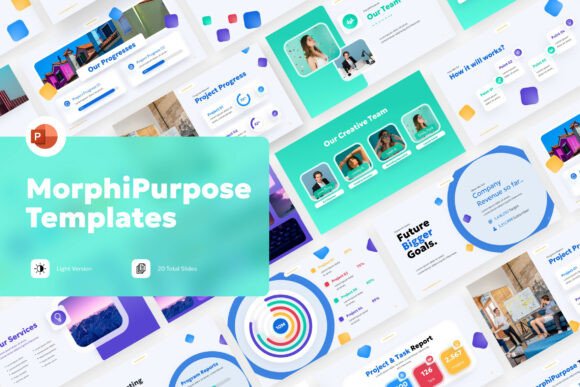
If you’ve ever struggled with a presentation that feels flat or disjointed, you understand the need for a toolkit that does more than just display text. The MorphiPurpose PowerPoint Template is designed to solve that problem through visual momentum. Unlike standard corporate decks that rely on static bullet points and generic stock imagery, this template utilizes dynamic morphing-style graphic elements. This creates a seamless visual narrative where one slide flows logically and artistically into the next. The "morph" effect isn't just a transition trick; it is integrated into the layout architecture, making your content feel like a cohesive story rather than a series of disconnected pages.
The visual personality of MorphiPurpose is defined by its vibrant mixed palette and colorful icon-driven layouts. It moves away from the muted greys and blues of traditional business software, embracing a more energetic aesthetic. This makes it particularly effective for audiences who need to grab and hold attention quickly. Whether you are a startup pitching a new app or a creative agency showcasing a portfolio, the template’s fluid visual transitions help guide the viewer's eye exactly where you want it. It provides a sense of movement and modernity that static slides simply cannot achieve.
Practical Application: From Agency Pitches to Classroom Learning
Versatility is the core strength of the MorphiPurpose PowerPoint Template. While it has a distinct modern flair, its structure is highly adaptable. For marketers and brand strategists, the icon-driven layouts are invaluable. Instead of hunting for icons that match a specific brand style, the template provides a cohesive set that can be recolored to fit any brand identity. This consistency is crucial when building trust with clients. You can use these slides to present complex data, marketing funnels, or campaign timelines without the visual clutter that often plagues standard graphic design presentations.
For educators and content creators, the template offers a way to make learning materials more engaging. The fluid visual transitions help maintain student focus, while the editable slide feature allows for quick customization of diagrams and charts. Because the template uses a 16:9 widescreen ratio, it is optimized for modern displays, ensuring your content looks sharp on projectors and monitors alike. It serves as a robust design asset for anyone needing to communicate ideas clearly and stylishly, bridging the gap between professional web design aesthetics and functional presentation needs.
Customization and Workflow: A Designer’s Perspective
One of the most common frustrations with premium templates is the difficulty of editing them. MorphiPurpose addresses this by being full editable and easy to use. The layout system is intuitive, allowing you to swap out images, change text, and modify color schemes without breaking the underlying design structure. This is particularly important for small business owners who may not have extensive experience with PowerPoint but need a professional result. The inclusion of help guide files further streamlines the process, offering practical advice on how to maximize the template's potential.
When it comes to font pairing, the template’s modern typography framework provides a solid foundation. While the specific fonts are not included in the stock imagery, the text placeholders are sized and spaced to work well with a variety of sans serif and serif typefaces. I recommend using a clean, geometric sans serif for headings to match the template’s fluid motion, paired with a highly readable serif or sans serif for body copy. This contrast helps establish a clear visual hierarchy, ensuring that your key messages stand out against the colorful backgrounds.
Evaluating Fit and Finalizing Your Project
Before committing to any design asset, it’s wise to evaluate how it fits your specific content needs. The MorphiPurpose PowerPoint Template excels in scenarios where storytelling and visual impact are paramount. If your project requires a conservative, text-heavy report, you might need to strip back some of the dynamic elements. However, for brand presentations, social media strategy decks, or creative pitches, its bold style is a significant advantage. The mixed palette can be adjusted to softer tones if needed, but the template truly shines when you embrace its vibrant energy.
Finally, consider the practicalities of your file management. The package includes the PowerPoint files necessary for immediate editing. Because the template is designed for commercial use scenarios, it is built to be robust and professional. It is an excellent choice for designers looking to speed up their workflow or entrepreneurs needing to impress stakeholders with minimal preparation time. By leveraging the morphing-style graphics and fluid transitions, you can transform a standard presentation into a memorable visual experience that resonates with your audience long after the meeting ends.