Moodboard & Creative Direction: The Designer's Secret Weapon
Starting a new branding project often feels like staring at a blank canvas with a client who knows what they want but can't articulate it. You need a way to bridge that gap between vague ideas and tangible design. This is where a well-structured Moodboard & Creative Direction template becomes invaluable. It's not just a collection of pretty pictures; it's a strategic tool that translates abstract concepts into a shared visual language, setting the entire project up for success from the very first client meeting.
What Exactly Is This Editable Template?
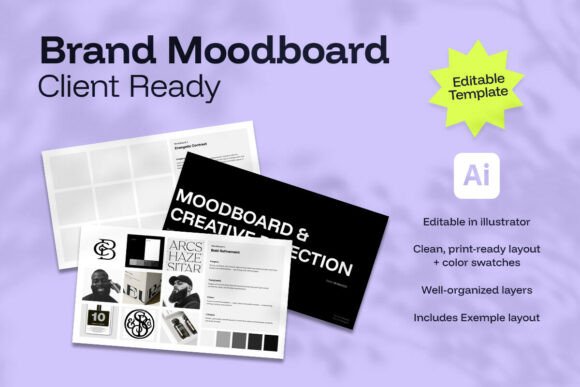
Think of this Moodboard & Creative Direction package as your professional starting point. It's a ready-to-use Adobe Illustrator file (.ai) containing a clean, print-ready layout across six landscape pages. You get two fully editable moodboards and integrated color swatches, all designed to help you design faster and show ideas clearly. The included example layout is a practical guide, demonstrating how to curate images, textures, typography samples, and color palettes into a cohesive story. It's a design asset built for real work, not just inspiration.
The true value lies in its structure. Instead of scrambling to arrange elements on the fly, you have a professional framework. This consistency makes you look professional and confident in front of clients. It allows you to give clients a strong visual direction before you start branding, effectively getting everyone on the same page. The template respects your time by providing the foundation, so you can focus on the creative curation—the part that actually requires your expertise.
How a Strategic Moodboard Shapes Brand Identity
A moodboard is far more than a collage; it's the visual thesis for a brand identity. When presenting a Moodboard & Creative Direction to a client, you're not just showing images—you're defining personality, tone, and aspiration. This process directly influences brand perception. A moodboard filled with organic textures, earthy tones, and hand-drawn elements suggests a different brand personality than one with sleek metallics, sharp geometry, and a modern typography style. It sets expectations for everything from logo design to packaging design.
This tool is crucial for establishing visual hierarchy and consistency early on. By agreeing on a visual direction, you create a reference point that guides all subsequent design decisions. It answers questions about style before they become problems. For example, the moodboard might imply the need for a serif font for elegance or a sans serif font for approachability, influencing your later choices in font pairing for the full brand system. This early alignment prevents costly revisions and ensures the final brand feels unified and intentional.
Practical Applications Across Creative Projects
The uses for a solid Moodboard & Creative Direction extend far beyond initial client pitches. For editorial design, it can define the visual tone for a magazine spread or a book layout. In web design, it helps establish the aesthetic for UI elements, imagery, and overall user experience. Social media graphics benefit immensely, as a moodboard ensures all posts feel like they belong to the same family, boosting recognition and audience engagement.
Consider these scenarios where this template proves its worth:
- Entrepreneurs and small business owners: Use it to articulate your vision to a hired designer, ensuring your brand identity aligns with your core values.
- Marketers and content creators: Develop a consistent visual style for campaigns, blogs, and video content that strengthens brand recall.
- Designers and freelancers: Standardize your client onboarding process, saving hours on each project and presenting your work with polish.
- Crafters and hobbyists: Plan the aesthetic for a product line, an Etsy shop, or personal creative projects with a professional framework.
It’s about making the abstract concrete. A moodboard can communicate whether a project should feel luxurious, rustic, playful, or authoritative. This clarity influences every choice, from the weight of a premium font to the photography style used in packaging design.
Maximizing the Template: Tips for Effective Use
To get the most out of this Moodboard & Creative Direction resource, approach it as a collaborative tool. Begin by gathering diverse inspiration—not just images you like, but elements that speak to the project's goals. Think in terms of typeface samples, color codes, material textures, and even quotes that capture the desired feeling. The template's layout helps you organize these logically, creating a narrative flow.
When presenting, walk your client through the story. Explain why you chose each element and how it contributes to the overall direction. This transforms the moodboard from a passive collection into an active discussion. It’s also a perfect stage to discuss practical considerations like readability—for instance, showing how a beautiful script font might work for a logo but not for body text, and pairing it with a clean sans serif font for balance.
Remember, the goal is alignment, not just approval. Use the moodboard to ask questions: "Does this direction feel right for your audience?" "Does this color palette evoke the right emotion?" This collaborative approach builds trust and ensures the creative work that follows is grounded in a shared understanding. The editable Adobe Illustrator file means you can tweak colors, swap out example images, and adjust the layout to fit each unique project, making it a versatile part of your design assets toolkit.
Beyond the Board: Building on Your Direction
Once a Moodboard & Creative Direction is approved, it becomes the blueprint for the entire project. The chosen color palette informs your brand identity guidelines. The implied typography direction—whether pointing toward a display font for impact or a family of weights for versatility—guides your font selection and pairing strategy. The overall style dictates the art direction for photography, illustration, and social media graphics.
This template, with its print-ready layout and example, helps you make that transition smoothly. You're not left wondering how to execute the vision; the moodboard provides clear cues. It ensures consistency across every touchpoint, from a business card to a website header, which is fundamental to building professionalism and trust with an audience. Investing time in this foundational step with a structured tool ultimately leads to more efficient workflows, clearer communication, and stronger, more resonant creative outcomes.