Monster Glassmorphic PowerPoint Template: A Visual Deep Dive
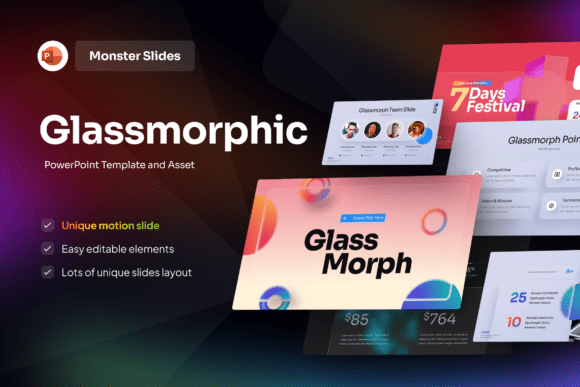
There's a certain magic that happens when a presentation moves beyond flat, static slides and into the realm of depth and texture. It captures attention, not with loud graphics, but with a sophisticated visual language that feels both modern and intuitive. The Monster Glassmorphic PowerPoint Template embodies this principle perfectly. It's not just a collection of slides; it's a curated design system built on the glassmorphism trend—those beautiful, frosted-glass UI elements, softly blurred panels, and vibrant gradient backdrops that create a stunning sense of depth and hierarchy.
Understanding the Glassmorphic Aesthetic
At its core, glassmorphism is about layering. Think of looking through a lightly frosted window at a colorful sunset. The background (your gradient) provides the mood and energy, while the foreground elements (your content panels) sit atop it with a translucent, glass-like quality. This effect is achieved through subtle transparency, background blur, and delicate border highlights. The Monster template leverages a pink and festival-inspired color palette, injecting energy and creativity into this sleek framework. The result is a presentation style that feels clean, futuristic, and incredibly engaging without sacrificing readability.
This design approach does more than just look good. It actively guides the viewer's eye. The blurred panels naturally push less critical information into the background, while the crisp text and icons on the frosted surfaces pop forward. This creates an inherent visual hierarchy that makes your message easier to follow. For a designer presenting a new app UI, a marketer pitching a digital brand, or a tech startup showcasing a product, this template provides a structure that makes complex information feel accessible and premium.
Where This Template Shines: Practical Applications
The versatility of the Monster Glassmorphic PowerPoint Template is one of its greatest strengths. Its style is inherently modern and digital-first, making it a perfect fit for specific contexts.
- Tech & Product Launches: The sleek, UI-inspired design is ideal for showcasing software interfaces, app features, or SaaS platforms. It makes the technology feel approachable and cutting-edge.
- Creative & Agency Pitches: For design studios, branding agencies, or marketing firms, this template acts as a live portfolio piece. It demonstrates an understanding of current trends and a commitment to high-quality presentation.
- Digital Brand & Social Media Strategy: Presenting a social media campaign or a digital brand overhaul? The vibrant, colorful backdrops mirror the dynamic nature of online content, making your strategy feel alive and relevant.
- Modern Corporate Updates: Even traditional businesses can use it for internal innovation reports, product development updates, or leadership presentations where a fresh, forward-thinking image is desired.
It’s less suited for highly formal, traditional industries where conservative design is the norm, but for anyone wanting to project innovation, creativity, and modernity, it's an exceptional tool.
Leveraging the Template for Maximum Impact
Having a powerful design asset like this is the first step. Using it effectively is the next. Here’s how to get the most out of it.
Embrace the Structure, Then Customize. The template provides editable slides with a 16:9 widescreen ratio and free fonts included. Start by using its pre-built layouts. They are designed for optimal flow and readability. Once you're comfortable, begin customizing. Swap out the gradient backgrounds to match your brand's color palette. Adjust the transparency levels of the glass panels to fine-tune the depth effect. The "full editable" nature means you can tailor every element.
Prioritize Readability Above All. Glassmorphism relies on contrast. Always ensure your text has sufficient contrast against the frosted panels. Use the strong tag for key headings or data points to make them stand out. Test your slides on a projector and a laptop screen—what looks clear on your monitor might need more contrast in a brighter room. The included fonts are chosen for clarity within this design system, but you can pair them with other sans serif fonts for variety, provided they maintain that clean, modern typography feel.
Think in Layers, Not Just Slides. Treat each slide as a mini-composition. Your gradient background is your canvas. The glass panel is your frame. Your text and imagery are the focal points. Use this layering to create a narrative flow. You might have a slide where the background image is slightly more prominent, drawing the audience in, before transitioning to a slide where the content panel takes center stage for detailed discussion.
Consistency is Your Professionalism. The template provides a cohesive design system. Stick to it. Use the same style of glass panel for all your main content, the same font pairings, and the same color accents throughout. This consistency builds a professional brand identity for your presentation itself, making it more memorable and trustworthy. It’s the difference between a collection of pretty slides and a polished, persuasive deck.
The Monster Glassmorphic PowerPoint Template is more than a set of pretty slides; it's a framework for communicating ideas with clarity and contemporary style. By understanding its visual principles and applying them thoughtfully to your content, you can create presentations that don't just share information—they make an impression.