Elevate Your Presentations with Lumino Power Point Template
Creating a presentation that captures attention and communicates your message effectively is a common challenge. Many templates look generic or require extensive customization, eating into valuable time. The Lumino Power Point Template is designed to solve this problem by offering a comprehensive, visually cohesive toolkit for professionals who need polished results quickly.
A Foundation of Visual Harmony and Variety
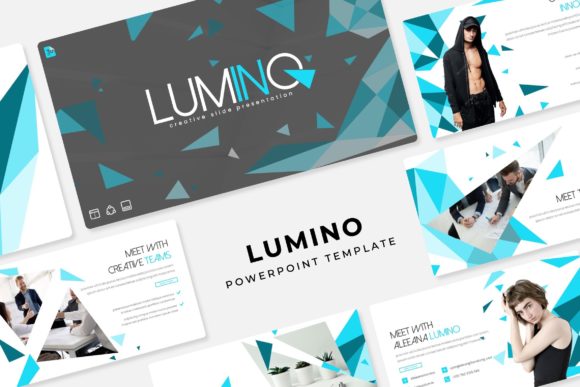
At its core, Lumino is a collection of over 150 meticulously crafted slides. This volume is not about quantity for its own sake; it's about providing the right slide for every possible context within a business or creative narrative. The template is built on a system of five premade color palettes. Each palette contains 30 unique slides, resulting in a total of 150 slides that are ready to use. This approach ensures visual consistency from the first slide to the last, a critical component for a strong brand identity during a pitch, webinar, or internal report.
The design personality of Lumino strikes a balance between modern professionalism and creative energy. It avoids overly corporate stiffness and instead adopts a clean, contemporary aesthetic. The use of pixel-perfect illustrations and handcrafted infographics adds a layer of authenticity and visual interest that stock graphics often lack. These elements are not just decorative; they serve to simplify complex data, making your information more accessible and memorable for your audience.
Practical Features for Real-World Use
What makes a template truly valuable is its usability. Lumino is built with practicality at the forefront. Every graphic element is fully resizable and editable. This means you can adjust charts, icons, and diagrams to fit your specific data without distortion or loss of quality. The inclusion of picture placeholders with a simple drag-and-drop function streamlines the process of adding your own images. You can swap out example photos for your own product shots, team pictures, or branded visuals in seconds.
The template's structure is based on Master Slides. This is a fundamental feature for efficient design. By editing the Master Slide, you can make global changes to fonts, colors, and layouts across all 150 slides simultaneously. This ensures perfect consistency and saves an enormous amount of time compared to editing each slide individually. For entrepreneurs and small business owners managing multiple aspects of a brand, this level of control is invaluable.
Beyond the Boardroom: Diverse Applications
While ideal for corporate presentations, the Lumino Power Point Template's versatility extends far beyond. Its clean lines and modular design make it an excellent resource for a wide range of projects.
- For Marketers and Content Creators: Use the template to design engaging social media graphics, webinar slides, or digital lookbooks. The variety of slides allows for creating a series of consistent posts or a complete visual campaign.
- For Educators and Bloggers: Transform course materials, workshop content, or blog post summaries into visually appealing slide decks that enhance learning and retention.
- For Designers and Agencies: The template serves as a solid foundation for client projects. It can be quickly customized to match a client's brand guidelines, accelerating the design process for pitch decks and internal communications.
- For Personal Projects: Create memorable slideshows for events, portfolios for creative work, or visual resumes that stand out in a competitive job market.
The inclusion of Section Break Slides and dedicated Gallery and Portfolio slides demonstrates an understanding of narrative flow. These specialized slides help organize your content logically, guiding your audience through your story or argument with clear visual cues.
Choosing and Implementing Lumino
When evaluating if Lumino is the right fit, consider the tone of your project. Its modern, slightly dynamic personality suits forward-thinking brands, tech startups, educational content, and creative portfolios exceptionally well. If your brand identity is extremely traditional or minimalist, you may want to assess whether its illustrative style aligns with your established aesthetic.
Upon download, you will find 5 PPTX files corresponding to each color variation, along with a widescreen version and a helpful readme file. A key detail is the font used. The template specifies a free font, and the download includes a direct link to acquire it. This eliminates licensing headaches and ensures your presentation renders correctly on any computer. Always download and install this font before opening the template files to preserve the intended design.
For effective use, start by selecting the color palette that best matches your brand or topic. Then, use the Master Slide to input your logo and adjust the core color scheme if needed. From there, you can build your presentation by choosing slides from the various layouts provided. The handcrafted infographics are particularly powerful—use them to visualize statistics, processes, or timelines in a way that feels custom-made for your data.
In a landscape where visual communication is paramount, having a reliable, high-quality design asset like the Lumino Power Point Template is a strategic advantage. It reduces production time, enhances professionalism, and provides the creative flexibility needed to make a lasting impression. Whether you're closing a deal, educating an audience, or showcasing your work, Lumino provides the tools to do it with clarity and style.