Canva Frame Customer Review Template: A Practical Guide
Why This Template Changes the Game for Social Proof
If you're running a business, managing a brand, or creating content, you know how powerful customer feedback can be. The challenge isn't getting reviews—it's presenting them in a way that actually stops someone mid-scroll. That's where the Canva Frame Customer Review Template steps in. It's a drag-and-drop mockup system designed specifically for showcasing testimonials, client feedback, and product ratings in a polished, professional format.
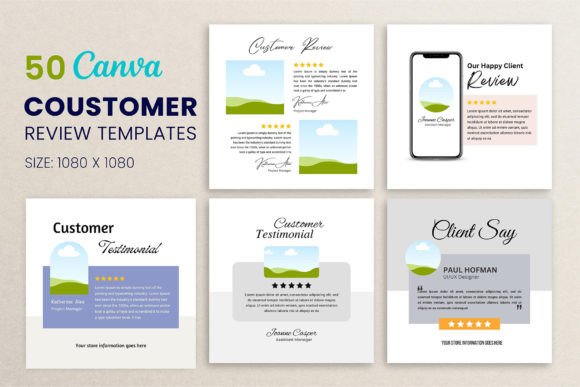
Unlike generic quote graphics or basic text overlays, this template gives you a realistic frame mockup that adds depth and context to your customer reviews. Think of it as a digital display case for your best feedback. The shadows, the clean layout, the customizable cover colors—it all works together to make your testimonials look like they belong on a magazine page rather than a hastily thrown-together social post.
What makes it genuinely useful is how little effort it takes. You open Canva, drag your photo into the frame, adjust a few colors to match your brand, and you're done. No design degree required. No wrestling with alignment tools. The template handles the heavy lifting so you can focus on the message.
Where This Template Fits Into Your Workflow
The Canva Frame Customer Review Template isn't limited to one type of project. Its versatility is honestly its strongest feature. Here's where I've seen it work well—and where you might find it useful too:
- Social media graphics – Instagram posts, Facebook ads, Pinterest pins, and LinkedIn testimonials all benefit from a clean, framed presentation. The 1080 x 1080 px size is already optimized for square-format platforms.
- Website design – Embedding styled review graphics on landing pages, sales pages, or about sections adds credibility without relying on third-party widget integrations.
- Product showcases – If you're launching a new product or running a seasonal campaign, pairing product mockups with real customer feedback creates a compelling visual narrative.
- Pitch decks and presentations – Entrepreneurs and marketers can drop these frames into slide decks to back up claims with real testimonials.
- Print materials – Think brochures, flyers, postcards, or even wall art for a retail space. The template's clean design translates well to physical formats.
- Books, magazines, and editorial layouts – Publishers and bloggers can use these frames to highlight reader reviews or featured quotes within a larger layout.
- Gifts and personal projects – Crafters and hobbyists might use the template to create personalized thank-you cards or memory books featuring kind words from friends and family.
The point is, you're not locked into a single use case. The Canva Frame Customer Review Template adapts to whatever you're building, which makes it a smart addition to any designer's or business owner's toolkit.
What Makes the Design Work So Well
Let's talk about the visual characteristics for a moment. The template uses a modern, clean aesthetic—nothing overly ornate or trendy that will feel dated in six months. The frame itself has subtle shadows that give it a realistic, almost three-dimensional quality. This isn't just decoration; it helps the review graphic feel tangible, like you're looking at an actual printed piece rather than a flat digital file.
The color customization is straightforward. You can match the frame and cover to your existing brand identity without any complicated hex-code guesswork. For small business owners who don't have a dedicated designer on staff, this kind of flexibility is invaluable. You get consistent branding across every piece of content without spending hours on color matching.
The drag-and-drop functionality also means you can experiment freely. Want to test how a different photo looks inside the frame? Just swap it out. Need to rotate or resize elements? Go ahead. The template is built to encourage iteration, not restrict it.
How It Impacts Brand Perception and Engagement
Here's something worth considering: the way you present customer feedback says a lot about your brand. A plain text quote on a white background reads as an afterthought. A well-designed, framed testimonial reads as intentional and professional. That difference matters more than most people realize.
When your audience sees a polished review graphic, they're not just reading the words—they're absorbing the visual context. The frame, the typography, the color palette, the shadows—all of these elements contribute to how trustworthy and credible your brand appears. It's the same principle behind good packaging design or a thoughtfully crafted logo design. Details shape perception.
Consistency plays a role too. If you're posting testimonial graphics regularly—on social media, on your website, in email campaigns—using a template like this ensures every piece looks like it belongs to the same family. That kind of visual cohesion builds recognition over time. Your audience starts to associate that style with your brand, which strengthens recall and trust.
Practical Tips for Getting the Most Out of It
A few recommendations based on real-world use:
- Start with your strongest review. Don't save your best feedback for later. Lead with the testimonial that speaks most directly to your audience's pain points or desires.
- Keep the text concise. The frame works best when the review is short and punchy. Long paragraphs get lost in the design. Aim for two to three sentences max.
- Match the photo to the message. If you're showcasing a product review, use a product image. If it's a client testimonial, a headshot or branded graphic works well. The frame supports both approaches.
- Test different color combinations. Try your brand's primary palette first, but don't be afraid to experiment with accent colors for seasonal campaigns or product launches.
- Pair it with complementary design assets. The template works beautifully alongside other Canva templates—social media kits, presentation decks, and brand boards. Building a cohesive set saves time and strengthens your overall visual identity.
One more thing: the template includes instructions, which is a small detail that makes a big difference. If you're new to Canva or haven't worked with mockup templates before, those guides walk you through the process without assuming prior knowledge. It's a thoughtful touch that lowers the barrier to entry.
Who Benefits Most from This Template
Marketers managing multiple client accounts will appreciate the speed. Small business owners building their brand from scratch will value the professionalism. Content creators and bloggers looking to diversify their visual content will find it adds variety without adding complexity. Even hobbyists working on personal projects—scrapbooks, gift albums, community newsletters—can use it to present feedback in a more visually appealing way.
The Canva Frame Customer Review Template isn't trying to reinvent design. It's solving a specific, common problem: how to make customer feedback look as good as it deserves to. And it does that job well, with minimal friction and maximum flexibility.
If you've been defaulting to plain text quotes or uninspired graphics for your testimonials, this template offers a better path. It's practical, adaptable, and genuinely useful across a wide range of projects. That combination is harder to find than it should be.